
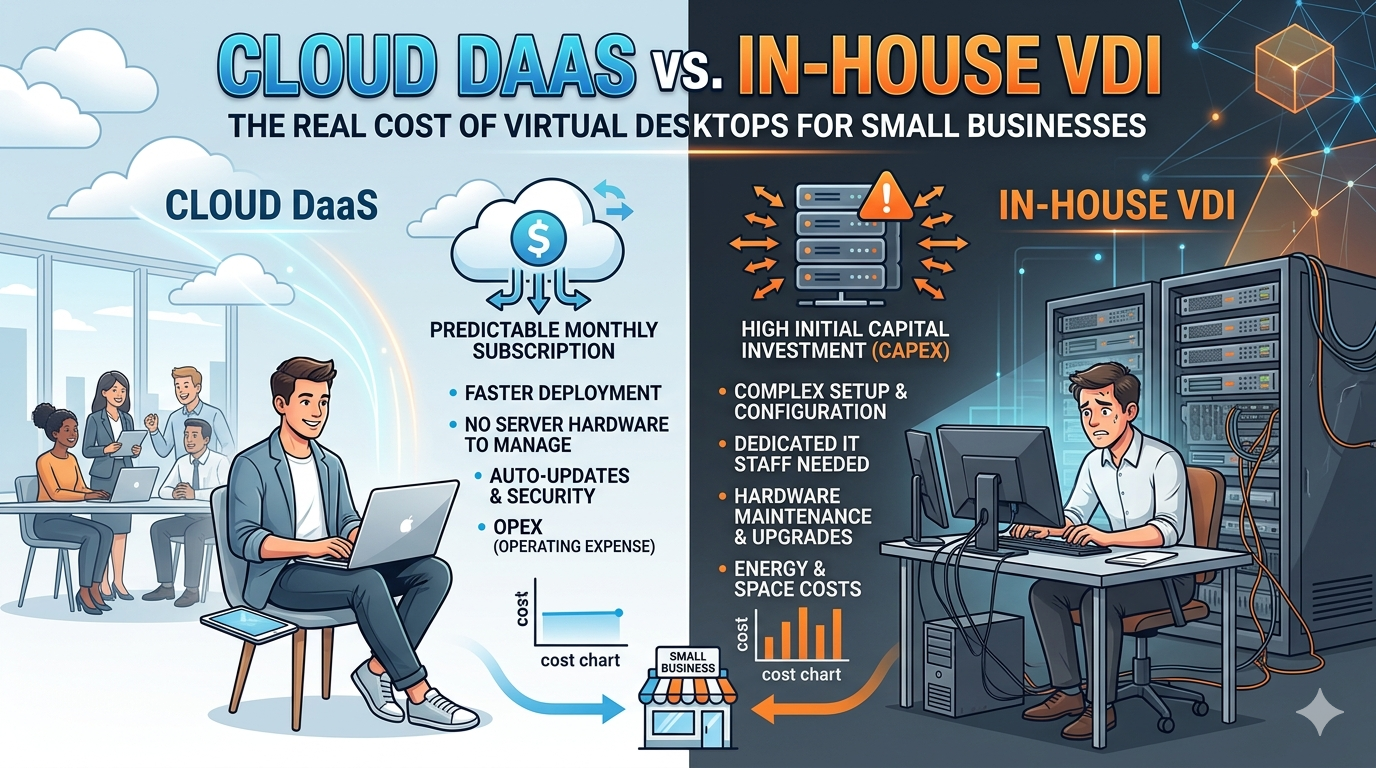
Your employees need virtual desktops. The question is whether you pay Microsoft $45 per user per month, or spend $140,000 building the infrastructure yourself.
For most small businesses with 10 to 50 employees, that's not really a question at all. Cloud Desktop-as-a-Service (DaaS) has become the default, and the numbers explain why. A 25-user cloud deployment on Windows 365 or Amazon WorkSpaces costs roughly $37,000 to $44,000 over three years. A comparable in-house setup runs $140,000 to $170,000 once you factor in hardware, licensing, and IT labor.
Gartner now reports that "net-new deployments are almost exclusively using DaaS." But "almost exclusively" isn't "always." There are legitimate scenarios where building your own VDI makes sense.
Let's break down both options with real numbers so you can make the right call.
The Three Cloud Platforms Worth Your Time
Not all cloud desktop services are created equal. Three stand out for small businesses in 2026, each targeting a different buyer profile. Here's how they stack up.
Windows 365 Business: The "Just Works" Option
If your team already lives in Microsoft 365, this is the path of least resistance. No Azure expertise needed. No domain controllers. No infrastructure headaches. Just a credit card and a few minutes of setup time.
What you get: A 2 vCPU / 8 GB RAM / 128 GB storage Cloud PC for $45 per user per month ($41 with Windows Hybrid Benefit). Compute, Windows license, storage, and basic management are all bundled into that flat rate.
The good: Teams, OneDrive, and Outlook run natively with optimized performance. Provisioning takes minutes, not days.
The trade-off: You pay whether the Cloud PC is used or not. There's no Linux option. You can't resize a VM without reprovisioning it. Flexibility is not the selling point here. Simplicity is.
Amazon WorkSpaces: The Flexible Powerhouse
WorkSpaces gives you more knobs to turn, and for part-time users, that flexibility translates directly into savings.
What you get: The Performance bundle (2 vCPU / 8 GB RAM) runs $45 per month in AlwaysOn mode. But here's where it gets interesting: switch to AutoStop billing and you pay just $7.25/month base plus $0.47/hour. If someone works fewer than 80 hours per month, you save real money.
The good: Supports Windows, Ubuntu, Amazon Linux, Red Hat, and Rocky Linux. Best fit for mixed-OS environments or companies already in the AWS ecosystem.
The trade-off: AWS's console can intimidate non-technical admins. Microsoft 365 integration isn't as smooth as Windows 365's. And once you start adding directory services, IPv4 charges, and data transfer fees, the total cost picture gets murky fast.
Azure Virtual Desktop (AVD): The Cost Leader (With a Catch)
AVD is the cheapest option on paper. In practice, it's only cheaper if you already have the right licenses and the right people.
What you get: AVD's standout feature is Windows 10/11 multi-session, which lets multiple users share a single VM. That pushes effective per-user costs down to $25 to $40 per month in pooled configurations. With three-year reserved instances, personal desktop costs drop to roughly $26 to $35 per user per month for infrastructure alone.
The good: Unbeatable economics for organizations holding Microsoft 365 E3/E5 licenses.
The catch: This is consumption-based pricing, which means costs fluctuate and need active monitoring. Setup demands networking, identity management, FSLogix profile configuration, and autoscale tuning. Adding a management layer like Nerdio ($4 to $8/user/month) helps but raises the price. For SMBs without dedicated IT? Skip this one, or outsource it to an MSP.
What About Citrix?
Despite its enterprise pedigree and superior HDX protocol, Citrix DaaS is not practical for small businesses. Licensing starts at $10 to $23 per user per month for the software alone, with cloud infrastructure adding another $20 to $40. Citrix historically requires 500-user minimums for direct engagement. Unless you're running 100+ seats, look elsewhere.
Head-to-Head: Cloud DaaS Pricing at a Glance
| Solution | Config | Per User/Month | 25 Users x 3 Years | Best For |
|---|---|---|---|---|
| Windows 365 Business | 2 vCPU / 8 GB / 128 GB | $45 ($41 w/ Hybrid Benefit) | $36,900 - $40,500 | Simplicity-first SMBs |
| AWS WorkSpaces | Performance AlwaysOn | $45 (+$4.19 RDS SAL) | $44,000 - $52,000 | AWS shops, mixed OS, part-time users |
| Azure Virtual Desktop | D2s_v5, 3-yr RI, pooled | $25 - $40 (infra only) | $31,500 - $35,100 + M365 E3 | M365 E3 shops with Azure skills |
| Citrix DaaS | Premium + Azure infra | $50 - $60+ | $45,000 - $54,000+ | Not recommended for SMBs |
What Building Your Own VDI Actually Costs
Let's say you want full control. You want your data on your servers, in your building, under your roof. That's a valid choice, but here's what it actually takes.
The Hardware Bill
For 25 virtual desktops, you need at minimum one production server, though two in a high-availability cluster is the responsible choice. A properly configured Dell PowerEdge R660 or R760 with dual Xeon Gold processors, 256 GB DDR5 RAM, and four NVMe SSDs runs $10,000 to $20,000 per unit.
Then add the supporting infrastructure:
- Managed network switch: $1,500 to $3,000
- Firewall/VPN appliance (SonicWall TZ470 or similar): $2,300 to $3,500
- UPS: $1,200 to $1,500
- Server rack: $2,000 to $3,000
- Endpoint devices: $600 to $900 each for new Dell OptiPlex thin clients, or $80 to $150 each for refurbished Dell Wyse 5070 units
Networking infrastructure alone reaches $7,000 to $12,000 before you've connected a single user.
The Software Decision: Open Source vs. Microsoft
This is where the two paths diverge dramatically.
The budget path combines Proxmox VE (a free, KVM-based hypervisor) with Apache Guacamole (a free, HTML5-based remote desktop gateway). Users connect through any web browser. Total software licensing cost: essentially zero.
But here's the honest truth. Proxmox is not a purpose-built VDI platform. It lacks a native connection broker, desktop pool management, and automated provisioning. Community tools like PVE-VDIClient and openVDI fill some gaps, but none are what you'd call production-ready enterprise solutions. Expect custom scripting with Terraform, Ansible, or the Proxmox API.
The polished path uses Microsoft Hyper-V with Remote Desktop Services. You get a more complete experience, but the licensing bill is steep: Windows Server 2025 Standard (around $2,135), 25 Windows Server User CALs (around $2,600), and 25 RDS User CALs (around $11,000) total roughly $15,700 before you've bought a single desktop license.
One potential shortcut: Windows Server Essentials, capped at 25 users, avoids CAL costs entirely. If your business qualifies, that's a meaningful saving.
Total Upfront Capital Expenditure
| Component | Proxmox Stack | Microsoft RDS Stack |
|---|---|---|
| Servers (2x HA cluster) | $20,000 - $30,000 | $20,000 - $30,000 |
| Networking + power + rack | $7,000 - $12,000 | $7,000 - $12,000 |
| Thin clients (25 units) | $2,000 - $3,750 (refurb) | $15,000 - $18,750 (new) |
| Software licensing | $0 - $500 | $15,700 |
| Total CapEx | $29,000 - $46,250 | $57,700 - $76,450 |
The Three-Year Picture: Where the Real Cost Hides
Here's where most businesses get burned. Raw infrastructure costs are only the beginning. IT labor represents 40 to 65% of in-house VDI's total cost of ownership, and it's the variable most consistently underestimated. A Wikibon study found organizations underestimate VDI TCO by 20 to 40% by overlooking operational overhead.
A competent IT generalist can manage a 25-user VDI deployment alongside other duties, allocating roughly 25% of their time. That's an imputed cost of $15,000 to $25,000 per year. Outsourcing to a managed service provider runs $70 to $250 per user per month, or $21,000 to $75,000 annually for 25 users.
Beyond labor, annual operating expenses add up quickly:
- Electricity: $1,200 to $2,000
- Business-grade internet: $2,400 to $6,000
- Hardware warranties: $2,000 to $4,000
- Software renewals: $1,000 to $3,000
That's $7,100 to $19,000 per year in recurring costs alone.
Full Three-Year Comparison
| Deployment | Year 1 | Year 2 | Year 3 | 3-Year Total | Per User/Month |
|---|---|---|---|---|---|
| Windows 365 ($45/user) | $13,500 | $13,500 | $13,500 | $40,500 | $45 |
| AWS WorkSpaces ($49/user) | $14,757 | $14,757 | $14,757 | $44,271 | $49 |
| AVD pooled (3-yr RI) | $11,700 | $11,700 | $11,700 | $35,100 | $39 |
| In-house (Proxmox + part-time admin) | $61,250 | $22,100 | $22,100 | $105,450 | $117 |
| In-house (MS RDS + MSP) | $118,450 | $52,000 | $52,000 | $222,450 | $247 |
Hidden Costs That Trip Up Both Sides
Cloud gotchas: You still need reliable internet ($300 to $500/month for business-grade fiber), endpoint devices ($2,500 to $7,000 for thin clients), and migration effort ($5,000 to $15,000 for data transfer, app testing, and pilot phases). Cloud costs also tend to creep upward at 5 to 15% annually as storage grows and vendors raise prices. Microsoft announced double-digit M365 price increases effective July 2026.
On-premises gotchas: The hardware refresh cycle at years 3 to 5 demands another $20,000 to $30,000. And then there's the knowledge-dependency risk. If the one admin who understands your VDI environment leaves, institutional knowledge walks out the door with them.
The breakeven math: On-premises typically becomes cheaper than cloud after year 2 once hardware is amortized. IronOrbit's data from legal and healthcare accounts confirms roughly 30% savings versus cloud after the second year. But only when IT labor costs stay controlled and the deployment scales past approximately 100 to 200 users. At 25 seats, the economies of scale simply aren't there.
When On-Premises VDI Still Wins
Despite the cost disadvantage at small scale, in-house VDI remains the right call in specific scenarios.
Data sovereignty and compliance. Healthcare organizations bound by HIPAA, financial firms under PCI-DSS, and government contractors with data residency requirements may need physical control over where data lives. Keeping data on-premises eliminates third-party data processing and simplifies audit trails.
Network performance. On-premises VDI delivers sub-millisecond latency on a local network versus 20 to 40 ms for cloud solutions. Manufacturing environments with unreliable internet, CAD/engineering teams manipulating large datasets, and financial trading operations all benefit from LAN-speed access.
Vendor lock-in protection. When Broadcom acquired VMware in late 2023, some customers faced licensing increases of six times their previous costs. An open-source Proxmox stack eliminates that risk entirely.
Existing infrastructure. If you already have server hardware with spare capacity, the incremental cost of adding VDI can be surprisingly low.
The downsides are equally concrete: no geographic redundancy without significant extra investment, scalability limited by physical hardware, and the persistent single-point-of-failure risk that cloud providers engineer away with multi-availability-zone architectures.
Market Trends Shaping This Decision in 2026 and Beyond
The DaaS market is growing at 7.9% CAGR toward $6 billion by 2029. On-premises VDI revenue growth is flat at roughly 2%, with actual user counts declining.
Gartner projects that by 2027, virtual desktops will be cost-effective for 95% of workers (up from 40% in 2019) and will serve as the primary workspace for 20% of the global workforce. Perhaps most striking: DaaS paired with thin-client endpoints is now cheaper than a traditional laptop for many use cases, at an estimated $1,936 per device annually versus $2,440 for a laptop.
Microsoft dominates. Gartner's 2025 DaaS Magic Quadrant names Microsoft the clear leader, and the company is visibly prioritizing Windows 365 over AVD for the SMB segment. The December 2025 launch of Windows 365 Copilot Business at $21/user/month signals deeper AI integration ahead.
A few emerging alternatives worth watching:
- Browser-based enterprise solutions like Island Enterprise Browser are positioning themselves as VDI replacements for SaaS-heavy organizations. No infrastructure required, and apps run at native speed.
- ChromeOS Flex offers a free thin-client OS that converts aging PCs into managed endpoints, particularly relevant now that Windows 10 reached end-of-support in October 2025.
- AI-powered management features like right-sizing VMs, self-healing capabilities, and predictive analytics are reducing operational overhead by an estimated 20 to 25%.
The Bottom Line: A Simple Decision Framework
Choose cloud DaaS when:
- Your workforce is hybrid or remote
- Your IT team is fewer than two people
- Upfront capital is constrained
- You need built-in disaster recovery
Choose on-premises VDI when:
- Regulations mandate local data storage
- Your internet is unreliable
- Latency requirements are extreme
- You're scaling past 100 to 200 users with stable workloads
Consider a hybrid model when:
- You have sensitive workloads that need to stay on-premises but general-purpose desktops that work fine in the cloud
- You need to handle seasonal bursts elastically while keeping a stable baseline on local hardware
For the typical 25-person small business making this decision today, the answer is cloud DaaS. The cost is lower, the management burden is lighter, and the risk is smaller. Save your capital for what actually differentiates your business, and let Microsoft or AWS worry about the servers.
Need Help Setting Up Virtual Desktops for Your Business?
Whether you're a Calgary small business exploring cloud DaaS for the first time or an Alberta company evaluating whether to migrate from aging on-premises infrastructure, getting the architecture right from day one saves thousands down the road.
At Asher Technologies, we help small and mid-sized businesses across Calgary and Alberta design, deploy, and manage virtual desktop environments. From Windows 365 rollouts to hybrid cloud-and-on-premises setups, we handle the technical complexity so you can focus on running your business.
Get in touch for a free consultation on the right virtual desktop strategy for your team.