
The Problem With Checking Ads by Hand
If you run Google Ads for a few clients, your morning probably looks like ours used to.
Open Google Ads. Pick a client. Look at what was spent yesterday. Check that no ad got rejected overnight. Scan the list of search terms for junk. Switch to the next client. Repeat.
That takes about fifteen minutes per client when nothing is wrong. It takes an hour when something is. And on the busiest mornings, when you most need to catch a wasted budget, it often does not happen at all.
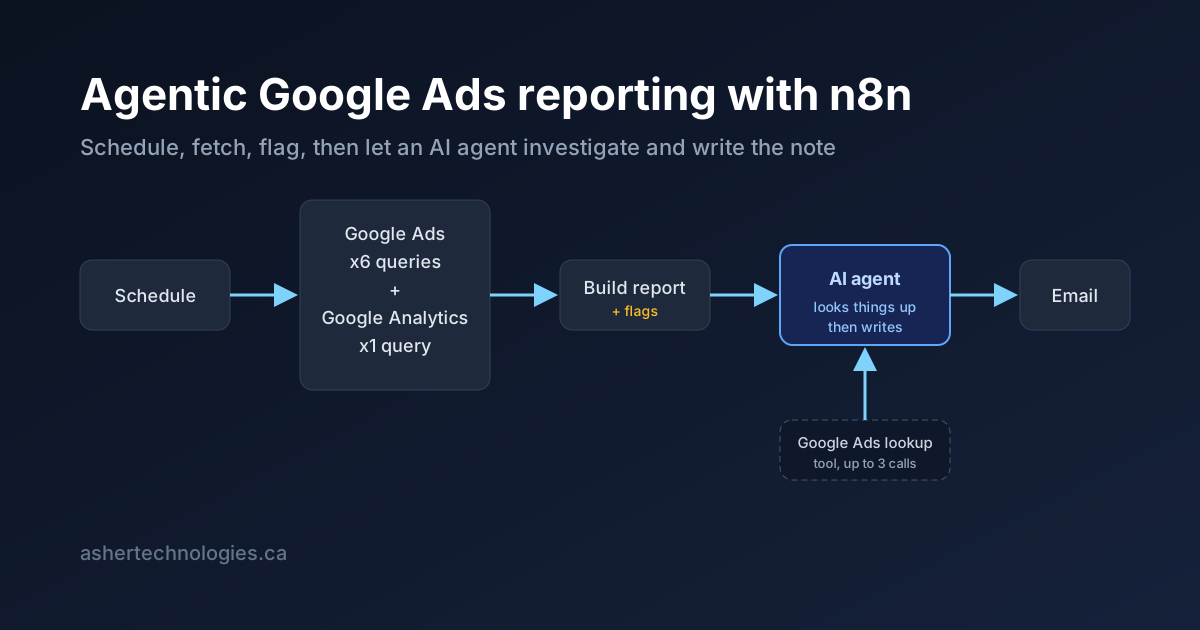
So we built a workflow in n8n that does this for us. It runs at 8 a.m. and 6 p.m. for every client. It pulls the numbers, checks them for problems, and then hands them to an AI agent. The agent looks into anything odd and emails us a short note: what is wrong, what is working, and what to do next.
This post explains how it works, in plain language. We cover what a workflow is, what n8n is, how we use it for Google Ads, and the part that makes it special, which is the AI agent.
What Is a Workflow?
A workflow is a set of steps that run in order when something happens.
When a form is submitted, save the contact, send a welcome email, and tell the sales team. That is a workflow. When it is 8 a.m., get the ad numbers, format them, and email them. That is a workflow too.
A task is a good fit for a workflow when:
- It repeats. Every day, every hour, or every time an event happens.
- It uses more than one tool. Google Ads, Google Analytics, email, a spreadsheet.
- The steps are the same every time. A person would follow the same checklist each morning.
Most office work is like this. About 90% of it is moving data from one place to another. Only the last 10% needs real thinking. Software has been good at the first 90% for years. The AI agent handles the last 10%. We will get to that.
What Is n8n?
n8n is a tool for building workflows. It is free and open source, and you can run it on your own server.
You build a workflow by dragging boxes onto a canvas and connecting them. Each box is called a node, and each node does one job:
- Start at a set time
- Call a website or service to get data
- Run a small piece of code
- Send an email
Data moves from one node to the next along the lines you draw.
If you have used Zapier or Make, it is the same idea. We picked n8n over those for a few reasons:
| What we needed | What n8n gives us |
|---|---|
| Keep client data on our own server | n8n runs on our server. Nothing goes through a third-party automation company. |
| Write code when the drag-and-drop boxes are not enough | A Code node lets us write JavaScript right in the workflow. |
| Talk to any service, even without a ready-made connector | A generic "HTTP Request" node can call any web service. Google Ads has no official n8n connector, and we did not need one. |
| Use AI agents | n8n has built-in nodes for AI agents, AI models, and the tools an agent can use. |
| Set up workflows from code, not by clicking | n8n has an API, so a script can create and update workflows for us. |
n8n has become very popular. We wrote more about it in our guide to AI agent tools. The short version: it is mature, cheap to run, and does not lock you in.
How n8n Automates Work You Do by Hand
Almost every workflow follows the same four steps: trigger, fetch, transform, act.
- Trigger. Something starts the workflow. A schedule, a new email, a form submission.
- Fetch. The workflow gets data from one or more services.
- Transform. It reshapes that data into what the next step needs.
- Act. It sends, saves, posts, or alerts.
Some examples from work we do for clients through our AI workflow automation service:
- A lead comes in from a website form. n8n adds it to the CRM and texts the owner if it looks like a good lead.
- An invoice arrives by email. n8n pulls out the line items and files them for approval.
- A server stops responding. n8n opens a ticket and posts the last few log lines to the team chat.
None of these need AI. They just need a reliable place to connect services. Our Google Ads report started the same way. Then we added the agent, and the email went from "here are the numbers" to "here is what the numbers mean and what to do about it."
The Google Ads Workflow, Step by Step
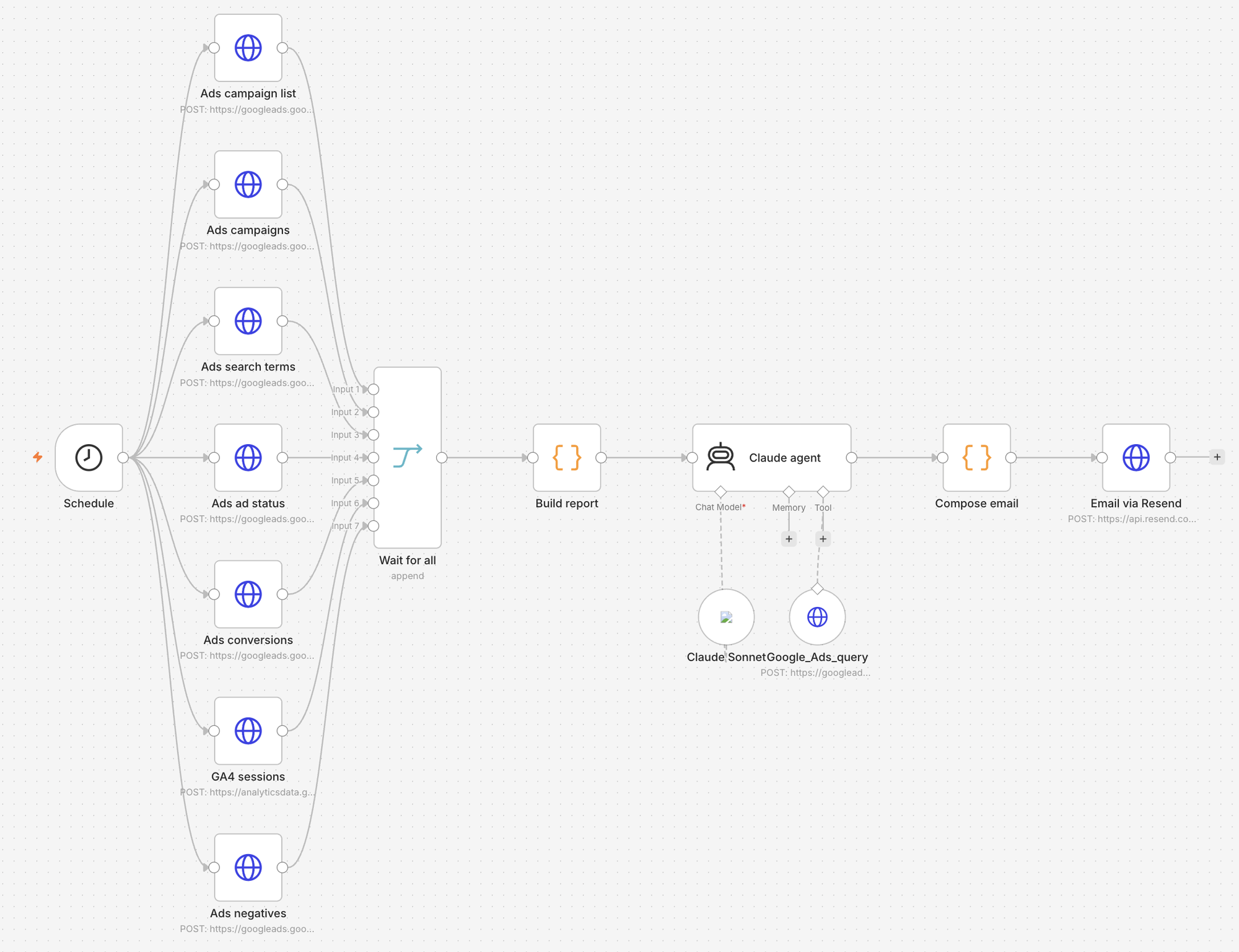
Here is the whole workflow as it looks on the n8n canvas. Seven data fetches run at once, come back together, and feed one chain of steps to the inbox.
Step 1: The schedule
A Schedule node starts the workflow at 8 a.m. and 6 p.m. in the client's time zone.
Two runs a day is on purpose. The morning email answers "what happened yesterday, and is anything broken?" The evening email answers "how is today going against the budget?"
Step 2: Get the data
Seven nodes run at the same time. Six ask Google Ads for data. One asks Google Analytics. They all use one Google login that the client approves once.
| What we fetch | Why |
|---|---|
| Every campaign and its daily budget | The budget is what we measure everything against |
| Daily numbers for the last 7 days: views, clicks, cost, conversions, phone calls, and how often the ad was shown | The main performance table |
| The top 25 search terms people typed before clicking | This is where wasted money hides |
| The approval status of every live ad | Catches an ad that Google rejected overnight |
| Conversions by type and day | Tells a phone call apart from a quote form |
| Every negative keyword already set up | So the agent never suggests one that already exists |
| Website visits from Google Analytics, by source | Confirms the clicks actually reached the website |
A negative keyword, if you have not met the term, is a word you tell Google not to show your ad for. If you sell roofing, "roofing jobs" is a negative keyword. It stops job seekers from clicking your ad.
Step 3: Wait for all
A Merge node waits until all seven fetches have come back. Nothing moves forward until then. If one fetch fails, the error is passed along instead of stopping the whole run.
Step 4: Build the report
This is a Code node with about eighty lines of JavaScript. It does the boring math a junior analyst would do. It groups the numbers by day, picks out yesterday and today, converts the cost into dollars, and writes a plain-text report.
It also checks for problems and adds a flag when it finds one:
- The daily budget was fully spent yesterday
- An active campaign got zero views yesterday
- More than half of possible views were lost because the budget ran out
- More than half of possible views were lost because the ad ranked too low
- An ad is not approved
- A search term looks like junk. Words like diy, jobs, salary, free, reddit, or how to
If any flag is raised, the email subject ends with "needs a look." If not, it ends with "OK." That one word is the difference between opening the email and skipping it.
Here are the interesting parts of a real morning report for one of our clients, DHI Exteriors, a licensed renovation contractor in south Calgary. This was day two after launch:
DHI Google Ads Morning report, 2026-10-11

Basement & Interior Renovation - Calls [ENABLED] budget CA$20.00/day
  yesterday: 57 impr, 3 clicks, CA$24.62, 0 conv, 0 calls, IS 16%
  FLAGS: budget fully spent yesterday; lost 68% of impressions to rank

Conversions yesterday: none
Ad review: all approved

Top search terms, last 7 days (clicks/impr):
  0/3  renovated bungalows  [Interior Renovation]
  0/2  houses for sale in calgary with legal basement suites  <-- check
  0/2  renovate kitchen  [Interior Renovation]
  0/2  hardwood flooring calgary  [Interior Renovation]
  0/1  secondary suite incentive program calgary  [Basement Development]
  ...

Negative keywords already in place (54): apartment, careers, diy, flooring,
  for sale, jobs, mike holmes, reddit, youtube, ...
A person can read that and see the problem in ten seconds: the budget is gone, the ads are ranking low, and most of the search terms are not from people who want a renovation. The question is whether you want a person reading seventeen of these every morning.
The Agentic Part
Everything so far is normal automation. It makes a report. It does not have an opinion.
The AI agent is where the workflow stops being a pipeline and starts being an analyst.
What makes it an agent, not just a prompt
You could send the report to an AI model and ask for a summary. That works, but the model can only talk about what you gave it. It cannot go look anything up.
An agent is different in one way: it has tools, and it decides on its own when to use them.
Our agent runs on Claude, through n8n's built-in AI nodes. It has one tool. The tool lets it ask Google Ads a question and get the answer back. The agent writes the question itself, in Google's query language. n8n takes the question the agent wrote and sends it to Google.
Here is what happens on each run:
- The agent gets the report as its input.
- It reads the flags. Say it sees that the budget ran out, and one search term is marked "check."
- It asks itself: does the report answer my question? "Which keyword is eating the budget?" is not in the report.
- It uses its tool to ask Google Ads for the ten most expensive keywords this week.
- It reads the answer. If it still has a question, it can ask up to two more times.
- It writes the note.
We limit the agent to three lookups per run. On a quiet day it does zero lookups and writes "nothing needs action" in two sentences. On a bad day it digs in before it speaks. That is exactly what you want from a junior analyst. A dashboard cannot do it.
The agent knows each client's rules
The second thing that makes this work is that the agent is not generic. Every client has a short list of rules, and those rules are given to the agent before it reads the report. For DHI Exteriors, the rules look like this:
- The goal is phone calls and quote requests for basement and interior renovations. No flooring-only jobs. South Calgary only.
- The budget cap is CA$900 a month. Never suggest spending more. If the budget is tight, suggest moving money around instead.
- The Business Profile campaign is paused on purpose until the client sends photos. Do not flag it as a problem.
- Conversion tracking went live two days after launch, so zeros in the first week are expected.
- We plan to switch to a different bidding strategy after about fifteen conversions.
Without those rules, any AI would complain about the paused campaign, suggest raising the budget on day one, and panic about zero conversions in week one. With the rules, the agent reads the account the same way we would.
The agent also has strict limits on what it writes. Under 180 words. Plain text. A two-sentence verdict, up to three observations with numbers, and up to three suggestions, each marked Do now or Watch. It must never suggest a negative keyword that is already set up. That is why we fetch the list of existing negatives and include it in the report.
What the agent actually writes
Here are the key lines from the note the agent wrote for that report, exactly as they landed in our inbox:
Verdict: Nothing is broken, but spend is going to weak traffic. The budget ran out on 3 clicks (CA$24.62, about CA$8.20 each), and 0 conversions is expected because tracking only went live Oct 10-11.
Most of the 7-day terms are off-target: renovated bungalows, renovate kitchen, "houses for sale in calgary with legal basement suites". Several of these are already blocked by existing negatives, so they are no longer a leak.
Do now: add negatives "renovated bungalows", "legal basement suites", "subfloor", "incentive", "kitchen". "For sale" is already blocked, so skip it. Do now: add "hardwood" and "concrete" as negatives, since "flooring" does not catch "hardwood flooring calgary". Watch: if rank loss stays above 60% after 3 days, tighten to exact and phrase match on core basement terms. Do not raise the budget.
Notice what the agent did not do. It did not panic about zero conversions, because it knew tracking had just gone live. It did not suggest raising the budget, because the rules forbid it. It did not flag the paused campaign.
Now notice what it did do. It checked each junk search term against the 54 negatives already in place and only suggested new ones. It spotted that "flooring" as a negative does not block "hardwood flooring calgary", which is a detail a tired human would miss at 8 a.m. And it gave a clear condition for the next step: wait three days, then tighten match types if rank loss stays high.
That is the difference between a summary and an analyst.
Step 5: Send the email
One more Code node puts the agent's note on top and the full report underneath, with a divider between them. That way we can check any claim against the raw numbers without leaving the email. The last node sends it through Resend, an email delivery service.
One Script, Every Client
The last design choice is what makes this work for an agency instead of just one account. We never build a client's workflow by clicking around in n8n.
Each client has one small text file. It holds the things that change from client to client: the business name, the Google Ads account, the time zone, when to send, who to send to, and the rules for the agent. A short Python script reads that file, builds the whole workflow, and pushes it to n8n.
Adding a client takes one copied file, one Google sign-in, and one command. Changing a client's rules means editing the text file and running the command again.
This matters more than it sounds. When we improve the flag checks or make the agent's instructions better, every client gets the update on the next push. No clicking through seventeen workflows.
What We Learned
- Do the math in code, not in AI. The Code node adds up the numbers and raises the flags. The agent explains what they mean. Never ask an AI to do arithmetic that plain code can do perfectly.
- Give the agent fewer tools. One well-described Google Ads lookup covers almost every follow-up question. More tools meant more wandering.
- Cap the loop. Three lookups per run. The agent never runs away, and each run costs a few cents.
- Rules beat clever prompts. Five lines of client rules improved the output more than any prompt trick.
- Put the raw numbers under the note. People trust an AI summary when they can check it in the same email.
- Small gotcha. For Claude 5 models, the n8n Anthropic node needs "thinking mode" set to adaptive. It rejects "disabled." That cost us an hour.
Is This Right for Your Business?
If you run ads for clients, or you run your own ads and would rather not check them every morning, this is the shape of the answer. A scheduled workflow that fetches what matters. A code step that flags what is wrong. An agent that knows your rules, can look things up, and tells you what to do.
The DHI Exteriors report has run every morning and evening since launch. And the same pattern works well beyond Google Ads. Swap the data sources for Meta Ads, Shopify orders, Stripe payouts, or support tickets, and the rest stays the same.
Want an agentic reporting workflow for your own campaigns or operations? Asher Technologies builds and hosts n8n automation for businesses across Alberta, from simple scheduled reports to agents that look things up before they write. See our AI workflow automation and digital marketing services, or contact us to talk about your use case.